This demonstration illustrates how to use a Simple Object Access Protocol (SOAP) based web service from within MATLAB. In the example you will connect to the OpenBQS Bibliographic Query Service server at the European Bioinformatics Institute (http://industry.ebi.ac.uk/openBQS) and use it to retrieve information from MEDLINE.
For more information on the use of web services see the "Using Web Services in MATLAB" section of the MATLAB External Interface manual.
In MATLAB, you use the createClassFromWSDL function to call Web service methods. The function creates a MATLAB class based on the Web Services Description Language (WSDL) definition for the web service. To use the function you provide a URL for the WSDL definition of the service.
% OpenBQS WSDL definition URL
wsdlURL = 'http://industry.ebi.ac.uk/openBQS/copies/BQSWebService.wsdl';
Create the classes. This will create a directory called @bqswebservice in the current directory.
className = createClassFromWsdl(wsdlURL)
className =
BQSWebService
The @bqswebservice directory contains automatically generated files that implement the openBQS web service methods.
dir @BQSWebService
.                        getBibRefCount.m
..                       getBibRefCount1.m
BQSWebService.m          getById.m
contains.m               getById1.m
destroy.m                getByIds.m
display.m                getByIds1.m
exists.m                 getEntryDescription.m
find.m                   getMore.m
find1.m                  getMore1.m
find2.m                  getNext.m
find3.m                  getNext1.m
find4.m                  hasNext.m
find5.m                  query.m
getAllBibRefs.m          query1.m
getAllBibRefs1.m         query2.m
getAllEntries.m          query3.m
getAllIDs.m              resetRetrieval.m
getAllValues.m           resetRetrieval1.m
getAllVocabularyNames.m
In addition to looking at the contents of the methods directory, you can also use the methods command to see what methods are available. You will notice that there are more methods available than files in the @bqswebservice directory. These are inherited methods that are available for all objects in MATLAB.
methods(BQSWebService)
Methods for class BQSWebService:


BQSWebService          getAllBibRefs1         getMore
contains               getAllEntries          getMore1
destroy                getAllIDs              getNext
display                getAllValues           getNext1
exists                 getAllVocabularyNames  hasNext
find                   getBibRefCount         query
find1                  getBibRefCount1        query1
find2                  getById                query2
find3                  getById1               query3
find4                  getByIds               resetRetrieval
find5                  getByIds1              resetRetrieval1
getAllBibRefs          getEntryDescription
In order to use the web service, you must first create an instance of the bqswebservice.
bqsws = BQSWebService;
You can confirm that this is an instance of the bqswebservice using the class command.
class(bqsws)
ans =
BQSWebService
The getbibrefcount1 method returns the total number of references in the repository.
getBibRefCount1(bqsws)
ans =
    13316299
The getallvocabularynames methods returns the names of all available controlled vocabularies.
getAllVocabularyNames(bqsws)
ans =
    'MEDLINE2004/JournalArticle/properties'
    'MEDLINE2004/*/citation_subset'
    'MEDLINENEW/resource_types'
    'MEDLINE2004/resource_types'
    'MEDLINE2004/Person/properties'
    'MEDLINENEW/JournalArticle/properties'
    'repository_subsets'
    'MEDLINE2004/*/publication_type'
You can access citation information for a specific MEDLINE entry using the getbyid method. This returns the information as an array of ints.
ints = getById(bqsws,'10194334');
You can convert the ints to a char array, then extract some information.
info = char(ints');
Title = regexp(info,'(?<=<ArticleTitle>)[^<]+','match','once')
Authors = char(regexp(info,'(?<=<LastName>)[^<]+','match'))
Title =
Time-resolved fluorescence anisotropy study of the refolding reaction of the alpha-subunit of tryptophan synthase reveals nonmonotonic behavior of the rotational correlation time.
Authors =
Bilsel
Yang
Zitzewitz
Beechem
Matthews
You can save the XML text to a file using the fprintf function.
filename = 'webservicedata.xml';
fid = fopen(filename,'w');
fprintf(fid,'%c',info);
fclose(fid);
You can view the contents of the file using a web browser.
web(filename,'-browser')
The XML file is in a very generic format that is very convenient for storing and transferring data but is not particularly easy to read. An XSLT stylesheet describes transformations that can be used to convert the data in an XML file into a different type of document. There is a sample stylesheet for Medline data called medline.xsl in the biodemos directory. The xslt function using this to convert the XML file into a much more easily readable document. For more details on XSL see http://www.w3.org/Style/XSL
xslt(filename,'medline.xsl','-web');
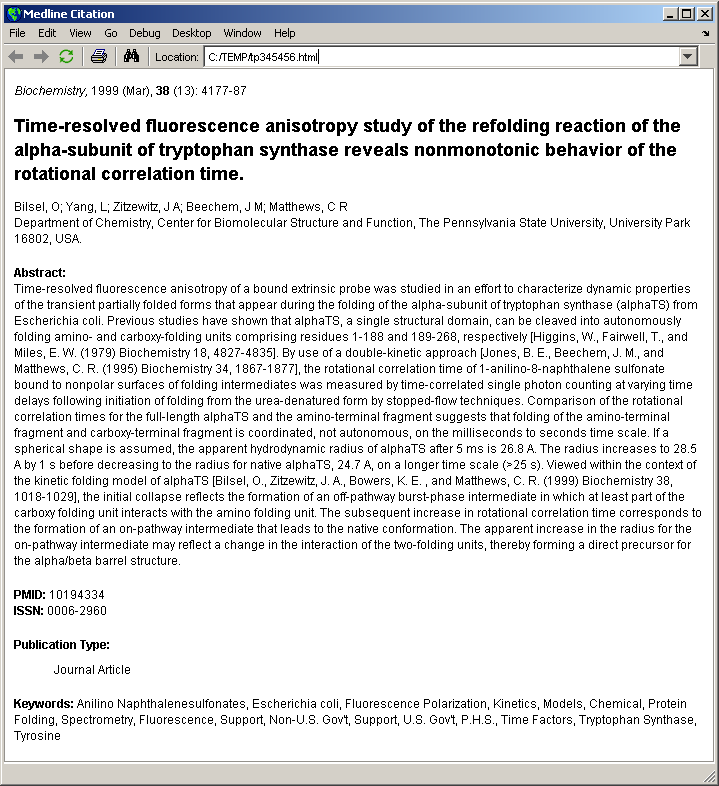
The function xml2struct converts an XML file into a MATLAB structure. The structure contains four fields, Name, Attributes, Data and Children. If a field has children then the Children field will be a structure with the same fields containing the nested information. This nesting can be many layers deep.
S = xml2struct(filename)
firstLevel = S.Children(4)
secondLevel = S.Children(4).Children(2)
thirdLevel = S.Children(4).Children(2).Children
S =
          Name: 'MedlineCitation'
    Attributes: [1x2 struct]
          Data: ''
      Children: [1x19 struct]
firstLevel =
          Name: 'DateCreated'
    Attributes: []
          Data: ''
      Children: [1x7 struct]
secondLevel =
          Name: 'Year'
    Attributes: []
          Data: ''
      Children: [1x1 struct]
thirdLevel =
          Name: '#text'
    Attributes: []
          Data: '1999'
      Children: []