This gives some examples of performing arithmetic and linear algebra with single precision data. It also shows an example M-File where the results are computed appropriately in single or double precision depending on the input.
Let's first create some data, which is double precision by default.
Ad = [1 2 0; 2 5 -1; 4 10 -1]
Ad =

     1     2     0
     2     5    -1
     4    10    -1
We can convert data to single precision with the single function.
A = single(Ad); % or A = cast(Ad,'single');
We can also create single precision zeros and ones with their respective functions.
n=1000;
Z=zeros(n,1,'single');
O=ones(n,1,'single');
Let's look at the variables in the workspace.
whos A Ad O Z n
  Name      Size                    Bytes  Class

  A         3x3                        36  single array
  Ad        3x3                        72  double array
  O      1000x1                      4000  single array
  Z      1000x1                      4000  single array
  n         1x1                         8  double array

Grand total is 2019 elements using 8116 bytes
We can see that some of the variables are of type single and that the variable A (the single precision verion of Ad) takes half the number of bytes of memory to store because singles require just four bytes (32-bits), whereas doubles require 8 bytes (64-bits).
We can perform standard arithmetic and linear algebra on singles.
B = A' % Matrix Transpose
B =

     1     2     4
     2     5    10
     0    -1    -1
whos B
  Name      Size                    Bytes  Class

  B         3x3                        36  single array

Grand total is 9 elements using 36 bytes
We see the result of this operation, B, is a single.
C = A * B % Matrix multiplication
C =

     5    12    24
    12    30    59
    24    59   117
C = A .* B % Elementwise arithmetic
C =

     1     4     0
     4    25   -10
     0   -10     1
X = inv(A) % Matrix inverse
X =

     5     2    -2
    -2    -1     1
     0    -2     1
I = inv(A) * A % Confirm result is identity matrix
I =

     1     0     0
     0     1     0
     0     0     1
I = A \ A % Better way to do matrix division than inv
I =

     1     0     0
     0     1     0
     0     0     1
E = eig(A) % Eigenvalues
E =

    3.7321
    0.2679
    1.0000
F = fft(A(:,1)) % FFT
F =

   7.0000
  -2.0000 + 1.7321i
  -2.0000 - 1.7321i
S = svd(A) % Singular value decomposition
S =

   12.3171
    0.5149
    0.1577
P = round(poly(A)) % The characteristic polynomial of a matrix
P =

     1    -5     5    -1
R = roots(P) % Roots of a polynomial
R =

    3.7321
    1.0000
    0.2679
Q = conv(P,P) % Convolve two vectors
R = conv(P,Q)
Q =

     1   -10    35   -52    35   -10     1


R =

     1   -15    90  -278   480  -480   278   -90    15    -1
stem(R); % Plot the result
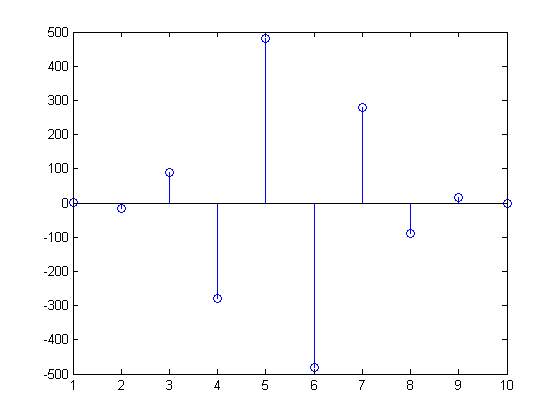
Now let's look at a function to compute enough terms in the Fibonacci sequence so the ratio is less than the correct machine epsilon (eps) for datatype single or double.
% How many terms needed to get single precision results?
fibodemo('single')

% How many terms needed to get double precision results?
fibodemo('double')

% Now let's look at the working code.
type fibodemo

% Notice that we initialize several of our variables, |fcurrent|,
% |fnext|, and |goldenMean|, with values that are dependent on the
% input datatype, and the tolerance |tol| depends on that type as
% well.  Single precision requires that we calculate fewer terms than
% the equivalent double precision calculation.
ans =

    19


ans =

    41


function nterms = fibodemo(dtype)
%FIBODEMO Used by SINGLEMATH demo.
% Calculate number of terms in Fibonacci sequence.

% Copyright 1984-2004 The MathWorks, Inc.
% $Revision: 1.1.4.1 $  $Date: 2004/03/22 23:53:55 $

fcurrent = ones(dtype);
fnext = fcurrent;
goldenMean = (ones(dtype)+sqrt(5))/2;
tol = eps(goldenMean);
nterms = 2;
while abs(fnext/fcurrent - goldenMean) >= tol
    nterms = nterms + 1;
    temp  = fnext;
    fnext = fnext + fcurrent;
    fcurrent = temp;
end