=head1 NAME

Protocol Handlers

=head1 Description

This chapter explains how to implement Protocol (Connection) Handlers
in mod_perl.


=head1 Connection Cycle Phases

As we saw earlier, each child server (be it a thread or a process) is
engaged in processing connections. Each connection may be served by
different connection protocols, e.g., HTTP, POP3, SMTP, etc. Each
connection may include more than one request, e.g., several HTTP
requests can be served over a single connection, when several images
are requested for the same webpage.

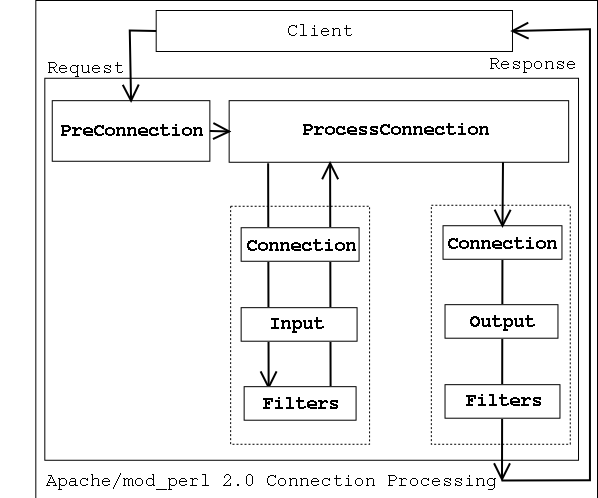
The following diagram depicts the connection life cycle and highlights
which handlers are available to mod_perl 2.0:

=for html
<img src="connection_cycle.gif" width="598" height="498" 
 align="middle" alt="connection cycle"><br><br>

When a connection is issued by a client, it's first run through
C<PerlPreConnectionHandler> and then passed to the
C<PerlProcessConnectionHandler>, which generates the response. When
C<PerlProcessConnectionHandler> is reading data from the client, it
can be filtered by connection input filters. The generated response
can be also filtered though connection output filters. Filters are
usually used for modifying the data flowing though them, but can be
used for other purposes as well (e.g., logging interesting
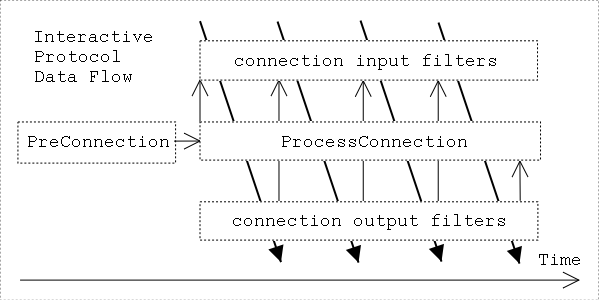
information). For example the following diagram shows the connection
cycle mapped to the time scale:

=for html
<img src="connection_cycle_time.gif" width="599" height="300"
 align="middle" alt="connection cycle timing"><br><br>

The arrows show the program control. In addition, the black-headed
arrows also show the data flow. This diagram matches an interactive
protocol, where a client send something to the server, the server
filters the input, processes it and send it out through output
filters. This cycle is repeated till the client or the server don't
tell each other to go away or abort the connection. Before the cycle
starts any registered pre_connection handlers are run.

Now let's discuss each of the C<PerlPreConnectionHandler> and
C<PerlProcessConnectionHandler> handlers in detail.

=head2 PerlPreConnectionHandler

The I<pre_connection> phase happens just after the server accepts the
connection, but before it is handed off to a protocol module to be
served.  It gives modules an opportunity to modify the connection as
soon as possible and insert filters if needed. The core server uses
this phase to setup the connection record based on the type of
connection that is being used.  mod_perl itself uses this phase to
register the connection input and output filters.

In mod_perl 1.0 during code development C<Apache::Reload> was used to
automatically reload modified since the last request Perl modules. It
was invoked during C<post_read_request>, the first HTTP request's
phase. In mod_perl 2.0 I<pre_connection> is the earliest phase, so if
we want to make sure that all modified Perl modules are reloaded for
any protocols and its phases, it's the best to set the scope of the
Perl interpreter to the lifetime of the connection via:

  PerlInterpScope connection

and invoke the C<Apache::Reload> handler during the I<pre_connection>
phase. However this development-time advantage can become a
disadvantage in production--for example if a connection, handled by
HTTP protocol, is configured as C<KeepAlive> and there are several
requests coming on the same connection and only one handled by
mod_perl and the others by the default images handler, the Perl
interpreter won't be available to other threads while the images are
being served.

This phase is of type
C<L<RUN_ALL|docs::2.0::user::handlers::intro/item_RUN_ALL>>.

The handler's configuration scope is
C<L<SRV|docs::2.0::user::config::config/item_SRV>>, because it's not
known yet which resource the request will be mapped to.

A I<pre_connection> handler accepts a connection record at its argument:

  sub handler {
      my $c = shift;
      # ...
      return Apache::OK;
  }

[META: There is another argument passed (the actual client socket), but
it currently an undef]

Here is a useful I<pre_connection> phase example: provide a facility
to block remote clients by their IP, before too many resources were
consumed. This is almost as good as a firewall blocking, as it's
executed before Apache has started to do any work at all.

C<MyApache::BlockIP2> retrieves client's remote IP and looks it up in
the black list (which should certainly live outside the code, e.g. dbm
file, but a hardcoded list is good enough for our example).

  #file:MyApache/BlockIP2.pm
  #-------------------------
  package MyApache::BlockIP2;
  
  use strict;
  use warnings;
  
  use Apache::Connection ();
  
  use Apache::Const -compile => qw(FORBIDDEN OK);
  
  my %bad_ips = map {$_ => 1} qw(127.0.0.1 10.0.0.4);
  
  sub handler {
      my Apache::Connection $c = shift;
  
      my $ip = $c->remote_ip;
      if (exists $bad_ips{$ip}) {
          warn "IP $ip is blocked\n";
          return Apache::FORBIDDEN;
      }
  
      return Apache::OK;
  }
  
  1;

This all happens during the I<pre_connection> phase:

  PerlPreConnectionHandler MyApache::BlockIP2

If a client connects from a blacklisted IP, Apache will simply abort
the connection without sending any reply to the client, and move on to
serving the next request.


=head2 PerlProcessConnectionHandler

The I<process_connection> phase is used to process incoming
connections.  Only protocol modules should assign handlers for this
phase, as it gives them an opportunity to replace the standard HTTP
processing with processing for some other protocols (e.g., POP3, FTP,
etc.).

This phase is of type
C<L<RUN_FIRST|docs::2.0::user::handlers::intro/item_RUN_FIRST>>.

The handler's configuration scope is
C<L<SRV|docs::2.0::user::config::config/item_SRV>>. Therefore the only
way to run protocol servers different than the core HTTP is inside
dedicated virtual hosts.

A I<process_connection> handler accepts a connection record object as
its only argument, a socket object can be retrieved from the
connection record object.

  sub handler {
      my ($c) = @_;
      my $socket = $c->client_socket;
      # ...
      return Apache::OK;
  }


Now let's look at the following two examples of connection
handlers. The first using the connection socket to read and write the
data and the second using L<bucket
brigades|docs::2.0::user::handlers::intro/Bucket_Brigades> to
accomplish the same and allow for connection filters to do their work.

=head3 Socket-based Protocol Module

To demonstrate the workings of a protocol module, we'll take a look at
the C<MyApache::EchoSocket> module, which simply echoes the data read
back to the client. In this module we will use the implementation that
works directly with the connection socket and therefore bypasses
connection filters if any.

A protocol handler is configured using the
C<PerlProcessConnectionHandler> directive and we will use the
C<Listen> and C<E<lt>VirtualHostE<gt>> directives to bind to the
non-standard port B<8010>:

  Listen 8010
  <VirtualHost _default_:8010>
      PerlModule                   MyApache::EchoSocket
      PerlProcessConnectionHandler MyApache::EchoSocket
  </VirtualHost>

C<MyApache::EchoSocket> is then enabled when starting Apache:

  panic% httpd

And we give it a whirl:

  panic% telnet localhost 8010
  Trying 127.0.0.1...
  Connected to localhost (127.0.0.1).
  Escape character is '^]'.
  Hello
  Hello
  
  fOo BaR
  fOo BaR

  Connection closed by foreign host.

Here is the code:

  file:MyApache/EchoSocket.pm
  ------------------
  package MyApache::EchoSocket;
  
  use strict;
  use warnings FATAL => 'all';
  
  use Apache::Connection ();
  use APR::Socket ();
  
  use Apache::Const -compile => 'OK';
  
  use constant BUFF_LEN => 1024;
  
  sub handler {
      my $c = shift;
      my $socket = $c->client_socket;
  
      my $buff;
      while (1) {
          my $rlen = BUFF_LEN;
          $socket->recv($buff, $rlen);
  
          last if $rlen <= 0 or $buff =~ /^[\r\n]+$/;
  
          my $wlen = $rlen;
          $socket->send($buff, $wlen);
  
          last if $wlen != $rlen;
      }
  
      Apache::OK;
  }
  1;

The example handler starts with the standard I<package> declaration
and of course, C<use strict;>.  As with all C<Perl*Handler>s, the
subroutine name defaults to I<handler>.  However, in the case of a
protocol handler, the first argument is not a C<request_rec>, but a
C<conn_rec> blessed into the C<Apache::Connection> class.  We have
direct access to the client socket via C<Apache::Connection>'s
I<client_socket> method.  This returns an object blessed into the
C<APR::Socket> class.

Inside the read/send loop, the handler attempts to read C<BUFF_LEN>
bytes from the client socket into the C<$buff> buffer.  The C<$rlen>
parameter will be set to the number of bytes actually read.  The
C<APR::Socket::recv()> method returns an APR status value, but we need
only to check the read length to break out of the loop if it is less
than or equal to C<0> bytes. The handler also breaks the loop after
processing an input including nothing but new lines characters, which
is how we abort the connection in the interactive mode.

If the handler receives some data, it sends it unmodified back to the
client with the C<APR::Socket::send()> method. When the loop is
finished the handler returns C<Apache::OK>, telling Apache to
terminate the connection. As mentioned earlier since this handler is
working directly with the connection socket, no filters can be
applied.


=head3 Bucket Brigades-based Protocol Module

Now let's look at the same module, but this time implemented by
manipulating bucket brigades, and which runs its output through a
connection output filter that turns all uppercase characters into
their lowercase equivalents.

The following configuration defines a virtual host listening on port
8011 and which enables the C<MyApache::EchoBB> connection handler, which
will run its output through C<MyApache::EchoBB::lowercase_filter> filter:

  Listen 8011
  <VirtualHost _default_:8011>
      PerlModule                   MyApache::EchoBB
      PerlProcessConnectionHandler MyApache::EchoBB
      PerlOutputFilterHandler      MyApache::EchoBB::lowercase_filter
  </VirtualHost>

As before we start the httpd server:

  panic% httpd

And try the new connection handler in action:

  panic% telnet localhost 8011
  Trying 127.0.0.1...
  Connected to localhost (127.0.0.1).
  Escape character is '^]'.
  Hello
  hello
  
  fOo BaR
  foo bar

  Connection closed by foreign host.

As you can see the response now was all in lower case, because of the
output filter.

And here is the implementation of the connection and the filter
handlers.

  file:MyApache/EchoBB.pm
  -----------------------
  package MyApache::EchoBB;
  
  use strict;
  use warnings FATAL => 'all';
  
  use Apache::Connection ();
  use APR::Bucket ();
  use APR::Brigade ();
  use APR::Util ();
  
  use APR::Const -compile => qw(SUCCESS EOF);
  use Apache::Const -compile => qw(OK MODE_GETLINE);
  
  sub handler {
      my $c = shift;
  
      my $bb_in  = APR::Brigade->new($c->pool, $c->bucket_alloc);
      my $bb_out = APR::Brigade->new($c->pool, $c->bucket_alloc);
      my $last = 0;
  
      while (1) {
          my $rv = $c->input_filters->get_brigade($bb_in, Apache::MODE_GETLINE);
          if ($rv != APR::SUCCESS && $rv != APR::EOF) {
              my $error = APR::strerror($rv);
              warn __PACKAGE__ . ": get_brigade: $error\n";
              last;
          }
  
          last if $bb_in->empty;
  
          while (!$bb_in->empty) {
              my $bucket = $bb_in->first;
  
              $bucket->remove;
  
              if ($bucket->is_eos) {
                  $bb_out->insert_tail($bucket);
                  last;
              }
  
              my $data;
              my $status = $bucket->read($data);
              return $status unless $status == APR::SUCCESS;
  
              if ($data) {
                  $last++ if $data =~ /^[\r\n]+$/;
                  # could do something with the data here
                  $bucket = APR::Bucket->new($data);
              }
  
              $bb_out->insert_tail($bucket);
          }
  
          my $b = APR::Bucket::flush_create($c->bucket_alloc);
          $bb_out->insert_tail($b);
          $c->output_filters->pass_brigade($bb_out);
          last if $last;
      }
  
      $bb_in->destroy;
  
      Apache::OK;
  }
  
  use base qw(Apache::Filter);
  use constant BUFF_LEN => 1024;
  
  sub lowercase_filter : FilterConnectionHandler {
      my $filter = shift;
    
      while ($filter->read(my $buffer, BUFF_LEN)) {
          $filter->print(lc $buffer);
      }
    
      return Apache::OK;
  }
  
  1;

For the purpose of explaining how this connection handler works, we
are going to simplify the handler. The whole handler can be
represented by the following pseudo-code:

  while ($bb_in = get_brigade()) {
      while ($bucket_in = $bb_in->get_bucket()) {
          my $data = $bucket_in->read();
          # do something with data
          $bucket_out = new_bucket($data);
  
          $bb_out->insert_tail($bucket_out);
      }
      $bb_out->insert_tail($flush_bucket);
      pass_brigade($bb_out);
  }

The handler receives the incoming data via bucket bridges, one at a
time in a loop. It then process each bridge, by retrieving the
buckets contained in it, reading the data in, then creating new
buckets using the received data, and attaching them to the outgoing
brigade. When all the buckets from the incoming bucket brigade were
transformed and attached to the outgoing bucket brigade, a flush
bucket is created and added as the last bucket, so when the outgoing
bucket brigade is passed out to the outgoing connection filters, it
won't be buffered but sent to the client right away.

If you look at the complete handler, the loop is terminated when one
of the following conditions occurs: an error happens, the end of
stream bucket has been seen (no more input at the connection) or when
the received data contains nothing but new line characters which we
used to to tell the server to terminate the connection.

Notice that this handler could be much simpler, since we don't modify
the data. We could simply pass the whole brigade unmodified without
even looking at the buckets. But from this example you can see how to
write a connection handler where you actually want to read and/or
modify the data. To accomplish that modification simply add a code
that transforms the data which has been read from the bucket before
it's inserted to the outgoing brigade.

We will skip the filter discussion here, since we are going to talk in
depth about filters in the dedicated to filters sections. But all you
need to know at this stage is that the data sent from the connection
handler is filtered by the outgoing filter and which transforms it to
be all lowercase.


=head1 Maintainers

Maintainer is the person(s) you should contact with updates,
corrections and patches.

=over

=item *

Stas Bekman E<lt>stas (at) stason.orgE<gt>

=back


=head1 Authors

=over

=item *

=back

Only the major authors are listed above. For contributors see the
Changes file.


=cut

